Choice Kwargs For Ren’py
A downloadable asset pack
More easily customize the display of Ren'Py choice menus!
Features:
-
Customize idle and hover text colors per choice
Don’t want all your choices to use the same GUI default? You’re covered! This lets you style individual choices with ease. -
Conditionally disable or remove choices
You're no longer stuck choosing betweenconfig.menu_include_disabled = Trueor manually removing options. Do both, whenever you want! -
Add tooltips to specific choices
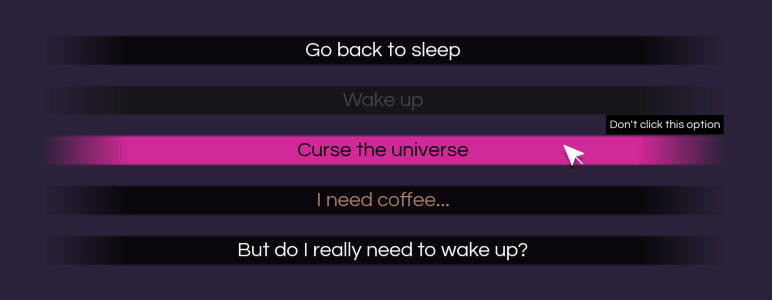
Display tooltip messages when hovering over individual choice buttons. Great for giving the player a warning before a risky selection! You can also add an alternative tooltip message for cases where the choice becomes disabled.
-
Strikethrough disabled choices
If conditions aren't met for choices, optionally make them appear with astrikethrough. -
Add custom image backgrounds for specific choice menus (or don't)
This lets you emphasize important decisions or just give each menu its own personality. -
Use these features only when you need them
You can use kwargs for extra customization, or keep choices default.
How It Works
This tool uses kwargs (key-word arguments) in the parentheses of your menu choices. Here’s what it looks like in action:
# You can pass arguments to the choice(items) screen inside
# parentheses after 'menu' and before the colon.
# This can be used to show a unique background image for a specific choice screen.
# If you don’t need a background, just write 'menu:' as usual.
menu(background="morning_choice_bg"):

    "It's time to wake up."

    # This is an ordinary choice with no kwargs.
    "Go back to sleep":
        "I'm so tired..."

    # This choice appears in a bright yellow, with a lighter hover, but only if energy_level > 3.
    # Otherwise, it's grayed out and disabled.
    "Wake up" (color="#FAFF39", hover="#f8fd6f", sensitive=energy_level>3):
        "Fine, I'll get up."

    # This one only shows up if cranky is True.
    # When shown, it's styled in red with a black hover and displays a tooltip warning when hovered.
    "Curse the universe" (color="#ff0000", hover="#000", condition=cranky, tooltip_text="Don't click this option"):
        "You know what, this universe sucks!"

    # This one has no condition, it always shows up.
    # It's here to demonstrate how to style a normal choice with a color + hover.
    "I need coffee..." (color="#a07d69", hover="#382015"):
        "Coffee will fix this."

    # This one displays a different tooltip message dependent on whether it's disabled or not.
    "Be productive" (sensitive=energy_level>5, tooltip_text="Sounds like a good idea...", disabled_tooltip_text="Your energy is too low."):
        "Okay, guess I'd better start!"
When you set a custom color/hover for a sensitive choice, it will use those when clickable, and switch to gui.choice_button_text_insensitive_color when unclickable.
That’s it! You now have full control over the look and logic of your menu choices.
I may update this project to include additional features in the future. If you have any ideas, let me know what would be useful!
Download
Click download now to get access to the following files:
Development log
- Update 7: Use tooltips on disabled choices! (and a new kwarg)12 days ago
- Update 6: More Flexible Background Images17 days ago
- Update 5: Various Minor Improvements22 days ago
- Update 4: Strikethrough Disabled Choices73 days ago
- Update 3: Improved Item CountingApr 25, 2025
- Update 2: Tooltip Functionality and Background CustomizationApr 23, 2025
- Update: Simpler SyntaxApr 17, 2025
Comments
Log in with itch.io to leave a comment.
Hi! Your code is cool, but is there any chance to make tooltips work with disabled choices?
Hi! That's actually a good question, it would be nice if it worked for disabled choices too.
I just did some tests and whenever a button has the sensitive False property, the Ren'Py tooltip will not display. I think this is because insensitive in Ren'Py affects more than just the styling, making it so the user can't interact with the screen element at all (so it can't run an action, display a tooltip, etc) .
The easiest fix I can think of is to circumvent the sensitive button property and instead make it look disabled (and make the action do nothing) if the player fails the check. In my test project it looks the same as an insensitive button but does display the tooltip.
Replace the textbutton part of the screen code with this
You may want to play around with the disabled button styling based on your set up and whether you're using a "gui/button/choice_insensitive_background.png"
There might be a more elegant solution, but I'm not aware of it. Let me know if this works for you!
Thank you! I found another but almost the same way:
if i.action.sensitive is False:
....textbutton i.caption:
........action NullAction()
else:
.....textbutton i.caption action i.action
I'm not sure which option is better, though. Seems like it doesn't really matter. But I keep testing. Thanks for the reply!
I will keep testing more as well and then upload a version that includes this since I do think it should be a feature! Thanks for pointing it out
No problem. For some reason it's a rare case, and all coding is about making tooltips for something that is available. But for my game I really needed tips for the locked choices.
I updated the code and added an extra feature where you can write in a different tooltip message for when a choice is disabled vs. not (which I thought might be handy for this use case), which is up now!
The main difference from my pastebin code is just that the styles for disabled choice buttons are now consolidated with the other styles rather than handled in the screen.
SAVED MY LIFE AND MY WHOLE FAMILY WITH THIS THANK YOU!!!! I hope both sides of your pillow will always be cold and your crops always watered
So glad this was helpful!!
This tool saved my entire ass 🙏
I'm entirely self-taught and had zero coding knowledge prior to throwing myself into Ren'Py, and this is the exact sort of framework I was needing as I was struggling through making my first big game. I plugged this into a smaller project I'm making for practice, and suddenly I could do all the little menu tricks I was hoping for!! I'd seriously been stressing over how I was going to pull off some of the code I was thinking of, and now it all seems possible.
Thank you so much for making and sharing this!!! (I especially appreciate the Simpler Syntax update, but every part of this is cool and great and accessible!)